Building Engine Tools for Zentera: Console, Hot Reloading & PS5
This article covers the technical details behind the engine tooling I built for Zentera, a voxel puzzle platformer made in the custom Kudzu engine at Breda University of Applied Sciences.
Engine Console
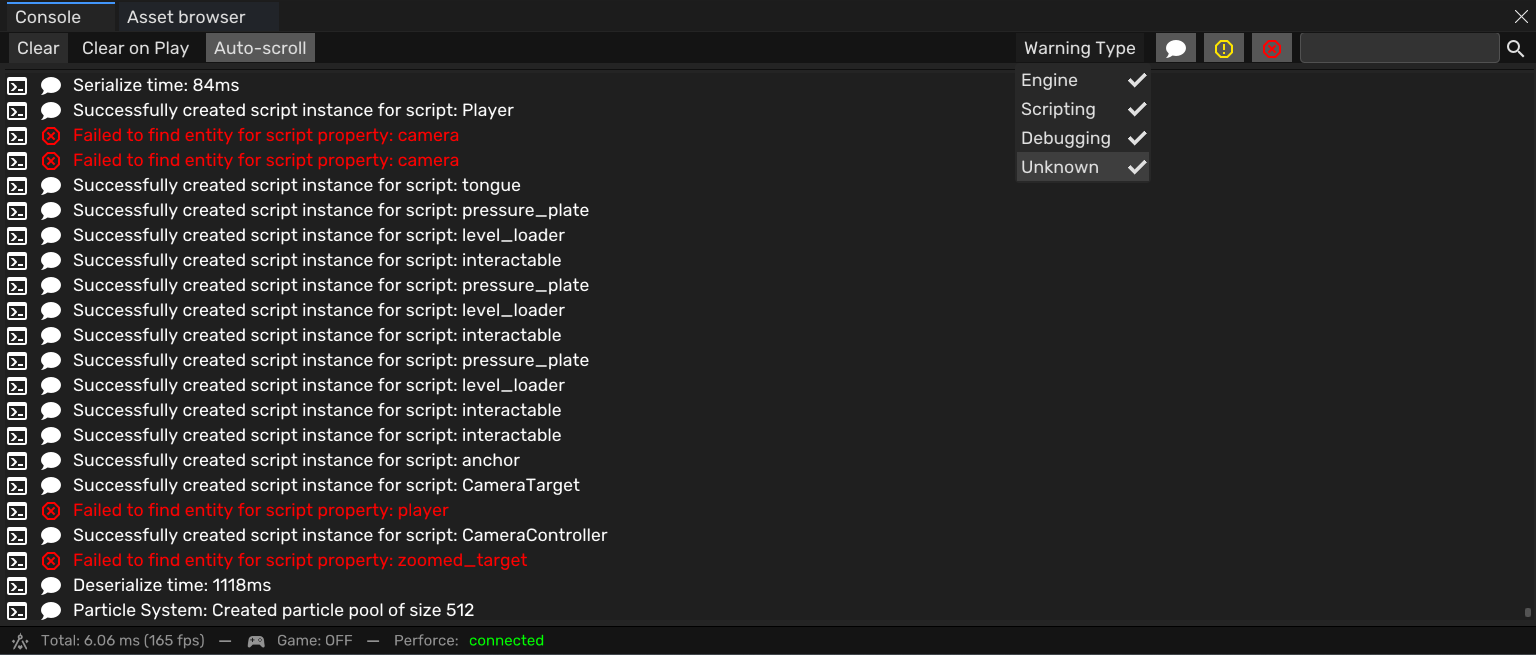
The console has two parts: a logger that captures output, and a UI for viewing it.
Stream Redirection
The logger redirects stdout and stderr to a log file using freopen_s and _dup2. This captures output from both engine code and external libraries (like AngelScript) without modifying any existing logging calls:
1
2
3
4
5
6
7
8
9
10
11
12
13
14
fopen_s(&log_file, KUDZU_LOG, "wb+");
AllocConsole();
console_window = GetConsoleWindow();
hide_console();

FILE* empty = nullptr;
freopen_s(&empty, "CONOUT$", "wb", stdout);
freopen_s(&empty, "CONOUT$", "wb", stderr);

stdout_fd = _dup(_fileno(stdout));
stderr_fd = _dup(_fileno(stderr));

_dup2(_fileno(log_file), _fileno(stdout));
_dup2(_fileno(log_file), _fileno(stderr));
The key insight is using _dup to save the original file descriptors before redirecting, so output can be restored later or sent to both the file and the console window simultaneously.
Console UI
The ImGui console parses log content into typed entries with:
- Warning levels: Info, Warning, Error – each with a configurable color
- Source types: Engine, Scripting – filterable independently
- Text search across all entries
- Auto-scroll with manual override
Colors are saved to editor settings so each developer can customize their view. The log file also persists after crashes, making it the primary debugging tool for non-programmers running release builds without a debugger.
Hot Reloading System
The hot reloading system monitors file modification timestamps and reloads any Resource in real time. Artists could edit voxel models in MagicaVoxel and see changes in-engine instantly, eliminating the need for engine restarts during asset iteration.
Initial Implementation
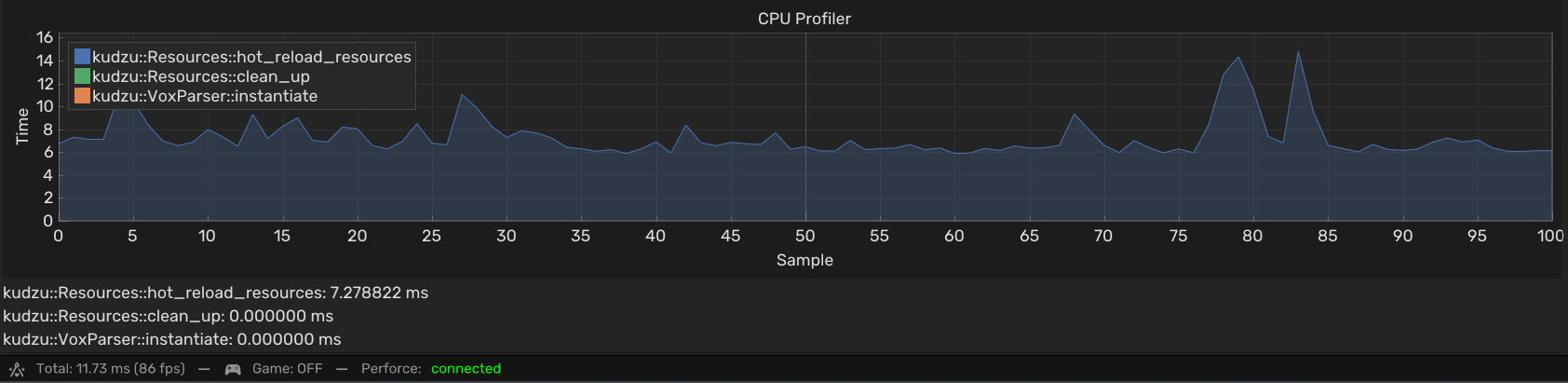
The first version checked every registered resource every frame by calling std::filesystem::last_write_time. This worked at low asset counts but scaled poorly – at production asset counts it consumed 7.28ms/frame, dropping the editor from 167fps to 86fps.
Optimization: 910x Faster
I redesigned the system with three architectural changes:
1. File-centric architecture
The original design checked each Resource individually. Multiple resources can reference the same file (e.g., a texture used by several materials), causing redundant filesystem calls. I introduced a FileResource struct that maps one file to many resources:
1
2
3
4
5
6
struct FileResource {
    std::string filename;
    FileIO::Directory directory;
    uint64_t last_modified;
    std::vector<size_t> resource_ids;
};
Now the system checks each unique file once, regardless of how many resources use it.
2. Queue-based reloading
Instead of reloading resources inline during the check loop, changed resources are added to an std::unordered_map queue. This separates detection from execution and handles a subtle problem: atomic write operations.
When an external tool saves a file, the write isn’t instantaneous. The file may be empty or incomplete for a few milliseconds. If we reload immediately on detecting a change, the reload can fail because the file hasn’t finished writing. The queue retries failed reloads on subsequent frames, with a timeout:
1
2
3
4
5
6
7
8
9
10
11
12
for (auto it = reload_queue.begin(); it != reload_queue.end();) {
    const size_t id = it->first;
    int& counter = it->second;
    if (resources[id]->reload()) {
        it = reload_queue.erase(it);
        reloaded = true;
    } else {
        if (++counter >= RELOAD_TIMEOUT) {
            it = reload_queue.erase(it);
        } else { ++it; }
    }
}
3. Throttled file checking
Filesystem polling now runs every 1 second instead of every frame. Most editors auto-save at most a few times per second, so per-frame checking is wasteful.
Result
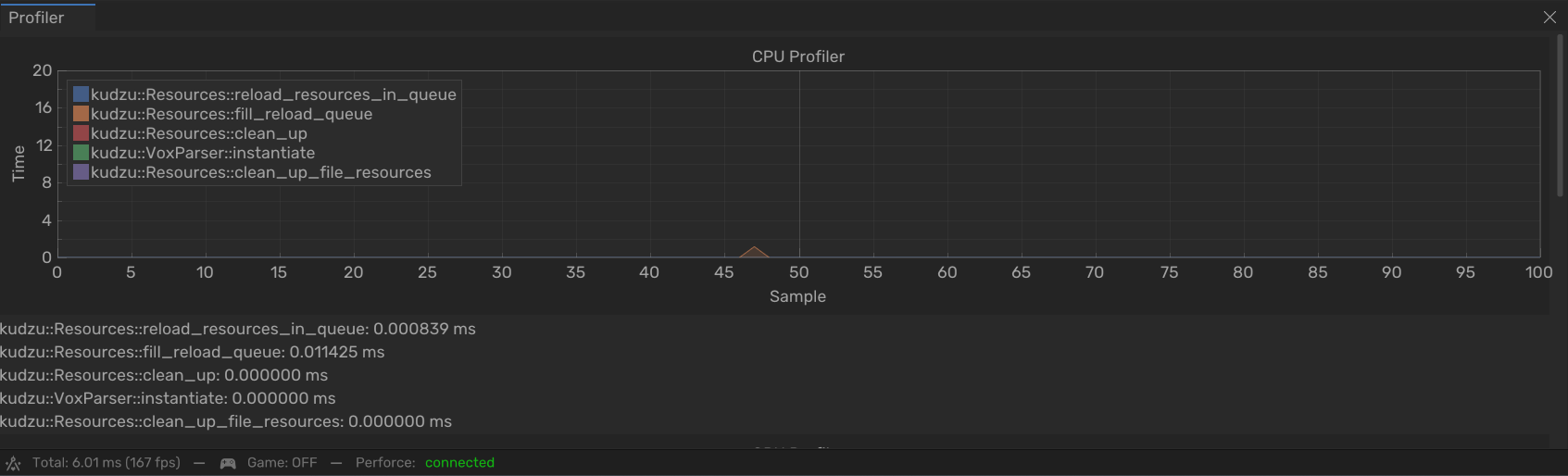
After the three changes: 0.012ms average (from 7.28ms), maintaining 167fps at full asset count. A 910x improvement.
PlayStation 5 Support
Due to NDA restrictions, implementation details for PS5 work are limited.
Scripting Engine Fix
The AngelScript scripting integration failed on PS5 due to stricter calling conventions on the platform. A type used throughout the scripting system wasn’t registered for automatic type conversion, which x64 handled implicitly but the PS5 architecture rejected. The fix involved adding the correct type registration flags so the scripting engine could perform the necessary conversions on the target platform.
Multithreaded Packaging Pipeline
The PS5 packaging process uses Python scripts to generate project files for the platform SDK toolchain. I fixed path resolution issues in the existing pipeline and added multithreaded packaging using std::atomic and std::thread so the engine remains responsive during the build process, with real-time status display in the editor toolbar:
1
2
3
4
5
6
7
8
9
10
11
12
13
14
15
16
17
18
namespace kudzu::packaging {
static std::atomic packaging_thread_active {false};
static std::atomic packaging_finished {false};
static std::atomic packaging_failed {false};
static std::thread packaging_thread;

bool start_packaging(const std::string& command) {
    if (packaging_thread_active) return false;
    reset_thread();

    packaging_thread = std::thread([command]() {
        packaging_thread_active = true;
        packaging_failed = system(command.c_str()) != 0;
        packaging_finished = true;
    });
    return true;
}
}
The editor displays packaging status in the toolbar via ImGui, so developers can continue working while the build runs in the background.